

My Quick Verdict
Unlucid AI is a fast, cheap browser tool for making AI images and short animated clips. It works, it costs little, and it needs no install. On those terms alone it does what it says.
But the marketing describes a different product than the one that exists. The homepage advertises “15+ video effects” and names five friendly ones: Dance, Squish, Zoom, Smash and Reveal. When I inspected the page source, the effect library also includes an undress effect and several explicit sexual effects. On the logged-out homepage, these sit behind “Sign in to view” thumbnails, so a casual visitor never sees them.
That changes what this tool is. An undress effect applied to an uploaded photo of a real person produces non-consensual intimate imagery, which is now a criminal matter in the United States, the United Kingdom, and a growing list of other countries. The word “uncensored” in the tagline is doing a lot of quiet work.
My recommendation splits by user.
For hobbyists making disposable AI clips from prompts, it is a reasonable $8.99 experiment. For businesses, agencies, and anyone producing client work, I would not touch it. The brand risk of an invoice from a platform whose feature set includes undress tooling is not worth the $20 you save over a mainstream generator.
Score: 3.4 / 10 for business use. 5.5 / 10 for casual personal use.
Does it work? Yes, quickly. Is it cheap? Yes. Bundles run $8.99, $29.99 and $59.99. Is it safe for brand or client work? No. Is it what the homepage says it is? Not entirely.
How I tested: In August 2026 I examined unlucid.ai’s public homepage, its Gems pricing page, and its published feature set, including the asset names in the page source. I checked its payment options, contact channels, and company disclosures, and I read the existing third-party reviews and tool directory listings. I did not create an account, buy gems, upload any image, or generate any output. I did not test the explicit features, and I am not describing how they work. Prices and features are current as of that date and change often.
Why This Review Reads Differently
Search “Unlucid AI review” and you will get plenty of results. Look at who published them.
One is on a competing video tool’s site. Another is on a competing image generator’s site. A third sits on a rival’s blog with a “switch from Unlucid” link in the sidebar. Several more are on AI directory pages that earn from listings and affiliate clicks.
Nearly every review currently ranking is published by someone selling an alternative or earning from the traffic. That does not make them all wrong. It does explain why they read like they were written by people who wanted you to leave the page and try something else.
It also explains a stranger fact. Across all that coverage, I could not find a single review that mentions what is plainly visible in the site’s own homepage code.
So this review does two things. It reports what the tool actually costs and produces, and it tells you what the marketing leaves out.
What Unlucid AI Is
Unlucid AI is a browser-based generative tool. Nothing to install, no local GPU, no model files. It runs in a tab.
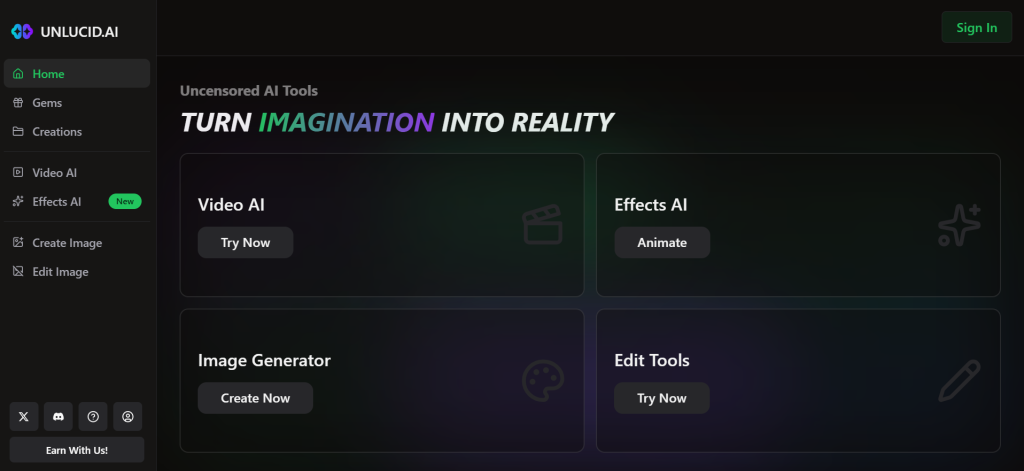
The interface splits into four workspaces:
- Video AI turns a text prompt into a short clip, with an optional starting image and a choice of portrait or landscape
- Effects AI applies a preset motion template to an image you upload
- Create Image is standard text-to-image generation across styles like realistic, cartoon, anime, 3D and sketch
- Edit Image handles object removal, background changes, and attribute edits
Its positioning is right in the tagline: uncensored AI tools for dreamers, free. The selling point is not better output than Midjourney or Veo. It is fewer refusals.
The site also runs a Discord server, an X account, a tutorials section, and an affiliate program.
Unlucid AI at a Glance
| Detail | What I found on 18 August 2026 |
|---|---|
| Type | Browser-based AI image and short video generator |
| Workspaces | Video AI, Effects AI, Create Image, Edit Image |
| Install required | None |
| Pricing model | One-time Gem bundles, no subscription |
| Bundles | $8.99 / $29.99 / $59.99 |
| Free tier | Daily free gems, claimable once per day |
| Watermark | Removed on all paid bundles |
| Advertised effects | “15+”, five named on the homepage |
| Undisclosed effects | Undress and multiple explicit sexual effects, hidden behind sign-in |
| Payment method | Card, presented as “Card with Telegram” |
| Company name or owner | Not disclosed anywhere I could find |
| Refund policy | None published |
| Support channel | Discord and X |
| Reported traffic | Around 7.8 million monthly visits, per third-party coverage |
What the Homepage Does Not Show You
This is the finding that shaped the whole review, so I want to be precise about what I saw and how.
The public homepage advertises “15+ Video Effects” and describes five of them with playful one-line captions. Dance, Squish, Zoom, Smash and Reveal. Every screenshot in every other review shows this same wholesome set.
Below that sits a Trending Videos grid. Roughly a third of those tiles are covered by a “Sign in to view” overlay rather than a preview.
The underlying asset filenames for those hidden tiles are visible in the page source. They include an undress effect, plus a series of explicit sexual effects covering acts and body modifications I am not going to list. These are not user uploads in a community gallery. They are named preset effects in the platform’s own trending grid, sitting in the same asset directory as Dance and Squish.
Two conclusions follow.
First, the advertised feature list is incomplete by design. A logged-out visitor, and therefore any reviewer who did not check the source or create an account, sees a family-friendly effects tool. The full library is one sign-in away.
Second, “uncensored” is not a stylistic claim. In most AI tool marketing, uncensored means the model will render violence, edgy themes or artistic nudity without refusing. Here it includes a purpose-built effect for removing clothing from an uploaded photograph. Those are different products with different consequences.
I want to be fair about one thing. An adult platform offering adult generation to consenting adults is a legitimate business, and plenty operate openly. The issue is not that these features exist. It is that they are absent from the public marketing while the tool is listed across mainstream directories as a general creative suite for marketers and educators.
The Legal Problem With the Undress Effect
I am not a lawyer, and this is not legal advice. But this part matters too much to skip.
An undress effect works by taking a photograph of a person and generating a version without clothing. When the photograph is of a real person who did not consent, the output is non-consensual intimate imagery.
The law moved fast on this. In the United States, federal legislation passed in 2025 criminalised the publication of non-consensual intimate images, including AI-generated ones, and required platforms to remove them on request. The United Kingdom’s Online Safety Act covers the sharing of intimate image deepfakes. Australia, South Korea and several EU member states have their own provisions, and more are in progress.
The practical exposure runs three ways:
For individuals, generating this material about a real person can carry criminal liability depending on where you live, and civil liability almost everywhere. The tool being available does not make the output legal.
For businesses, the risk is association. A card statement or expense report showing payment to a platform whose feature set includes undress tooling is difficult to explain to a client, a board, or a journalist. That risk exists whether or not anyone at your company ever touched the feature.
For the platform, the standard defence is a terms of service clause requiring consent and prohibiting misuse. I attempted to retrieve Unlucid AI’s Terms and Conditions page during this review and could not access it. Third-party reviews confirm the page exists. Whatever it says, a consent clause that nobody verifies is a legal shield, not a safeguard.
If you take one thing from this review, take this. Do not upload a photograph of another person to this platform. Not a colleague, not a client, not a public figure, not someone from social media.
Pricing, and the Real Cost Per Output
Credit is due here. The pricing page is clear, and clearer than most AI tools manage.
There is no subscription. You buy one-time Gem bundles and spend them as you go. Free gems can be claimed daily.
| Bundle | Price | Images | Edits | Videos |
|---|---|---|---|---|
| 120 Gems | $8.99 | up to 120 | up to 60 | up to 12 |
| 450 Gems | $29.99 | up to 450 | up to 225 | up to 45 |
| 1250 Gems | $59.99 | up to 1250 | up to 625 | up to 125 |
All three bundles remove the watermark.
The gem economics are simple to work out. An image costs one gem, an edit costs two, a video costs ten.
But the sticker price is not the real price. Multiply by your reroll rate.
Generative tools rarely produce a usable result first time, and independent testing of this one reports inconsistent quality across repeated generations. If two out of three attempts get discarded, your true cost per finished video on the smallest bundle moves from about $0.75 to roughly $2.25.
That is still cheap. It is just not as cheap as the table suggests, and it is the number you should use when comparing against anything else.
Two things to note before paying. There is no published refund policy that I could find. And the checkout presents card payment as “Card with Telegram”, which is an unusual arrangement for a mainstream SaaS product and worth understanding before you enter card details.
Output Quality
I did not generate anything, so I am reporting what independent testing has found rather than my own results, and I will flag it as such.
The consistent picture across reviewers who did test it is this. Generation is fast, often under a minute. Output looks decent at a glance and falls apart under scrutiny, particularly on human faces. Quality varies noticeably between runs of the same prompt.
The structural limitations are more telling than the quality, and they are visible from the interface alone:
- No layered editing and no timeline
- No asset library to build from
- Limited control over aspect ratio and clip duration
- Effects are presets, so you get the motion the template gives you
- Iteration means regenerating, not refining
That is a specific shape of tool. It is built for one-shot disposable output, not for art direction. If your workflow involves revisions, brand consistency or a client sign-off round, you will hit the ceiling quickly.
For a five-second social loop or a quick concept test, none of that matters.
Trust and Transparency
What checks out:
- The product genuinely works and is genuinely usable free
- Pricing is published plainly with no dark patterns or hidden auto-renewal
- No subscription trap, since bundles are one-time purchases
- Terms and Privacy pages exist
- Real community presence on Discord and X
- Reported traffic in the millions, so it is not a ghost site
What does not:
- No company name, owner, registered entity or address disclosed
- Public feature list omits a substantial part of the actual feature set
- No published refund policy
- No documentation on what happens to images you upload
- No stated safeguard against uploading photos of other people
- An affiliate program that pays people to promote a tool with undisclosed adult features
On E-E-A-T terms, the transparency gap is the core issue. A creative tool asking users to upload photographs should say who operates it, where data is stored, how long uploads are retained, and what verification exists around consent. None of that is available on the public site.
The affiliate program deserves a specific mention. Paying commissions to promoters while the public marketing omits the undress and explicit effects means a lot of people are recommending this tool without knowing what they are recommending.
Should Marketers and Agencies Use It?
Short answer: no, and the reasoning is not squeamishness.
Brand association is the whole problem. Your tool stack is part of your professional reputation. If a client, a competitor or a reporter looks up the platform in your invoice and finds an undress effect in its feature set, the conversation that follows is not one you win by explaining you only used it for background removal.
The commercial rights are unclear. Some third-party pages describe outputs as free for commercial use. I could not verify that against the platform’s own terms, which I could not access. Building client deliverables on an unverified licence is a bad trade for saving twenty dollars.
Client uploads are off the table entirely. Sending a client’s product photography, staff headshots, or unreleased assets to a platform with no published data retention policy is a straightforward confidentiality problem, before you even reach the content questions.
The output does not justify the risk. This is the deciding factor. If Unlucid produced results that mainstream tools could not match, there would be a genuine trade-off to weigh. It does not. It produces fast, average output that a dozen well-documented competitors also produce.
If you are building AI into a content workflow, the tooling decision should start with governance rather than price. That is the approach we take when advising clients on content and SEO strategy, because a cheap tool that creates a disclosure problem is not cheap.
Pros and Cons
Pros
- Genuinely free to start, with daily gems and no card required
- Very low cost per output compared to mainstream generators
- No install, no setup, runs in any browser
- Fast generation, usually under a minute
- Transparent, readable pricing with no subscription
- Watermark removed on every paid tier
- Four tools in one workspace
- Active Discord community and tutorials section
Cons
- Public feature list omits undress and explicit effects
- Undress tooling carries real legal exposure in many countries
- No company name, owner or registered entity disclosed
- No published refund policy
- No stated data retention or upload deletion policy
- No visible consent verification for uploaded photos
- Output quality inconsistent between runs, weakest on faces
- No layered editing, timeline or asset library
- Limited control over duration and aspect ratio
- Unusual payment arrangement at checkout
- Commercial usage rights not verifiable from the public site
- Affiliate program promotes a feature set most promoters have not seen
Who Should Use It, and Who Should Not
It may suit you if you:
- Are a hobbyist making disposable clips for personal social posts
- Want to test a visual concept quickly before committing to a real tool
- Are generating from prompts only, with no uploaded photographs of people
- Have been blocked by mainstream tools on legitimately artistic prompts
- Are happy to spend $8.99 and learn whether it fits
Do not use it if you:
- Produce client work or anything carrying a brand name
- Work at an agency, an enterprise, or anywhere with a procurement process
- Would upload photographs of colleagues, clients, or any real person
- Need consistent, art-directable output across a content calendar
- Handle confidential or pre-release visual assets
- Need verifiable commercial licensing for your deliverables
Alternatives Worth Considering
I am naming categories rather than affiliate picks, because most of the alternatives currently ranking for this term are being recommended by their own owners.
For image generation with clear licensing: Adobe Firefly and Canva are the safe institutional choices, with documented commercial terms and named companies behind them. You get fewer creative liberties and far fewer questions.
For serious AI video: the major model providers produce output that is not close to comparable, at a higher price. If quality matters, price is the wrong axis to optimise.
For an open uncensored setup: running Stable Diffusion locally gives you real creative freedom, your data stays on your own machine, and there is no third-party platform holding your uploads. It costs setup time instead of money.
For quick social effects: several mainstream tools now offer preset motion effects that cover the Dance and Squish territory without the rest of the library attached.
Final Scorecard
| Category | Score | Why |
|---|---|---|
| Does it work | 7 / 10 | Fast and functional |
| Output quality | 5 / 10 | Fine at a glance, weak on faces |
| Pricing clarity | 8 / 10 | Genuinely well presented |
| Value for money | 7 / 10 | Cheap, even after rerolls |
| Creative control | 3 / 10 | Presets only, no iteration tools |
| Marketing honesty | 1 / 10 | Advertised feature set is incomplete |
| Company transparency | 2 / 10 | No owner, no entity, no data policy |
| Safety and legal risk | 1 / 10 | Undress tooling, no visible safeguards |
| Business use | 3.4 / 10 | Not defensible for client work |
| Personal use | 5.5 / 10 | Cheap and fun with real caveats |
The bottom line. Unlucid AI is a competent budget generator, wrapped in marketing that does not accurately describe it. The tool is real, the pricing is fair, and the output is adequate for throwaway content.
But a platform that advertises Dance and Squish while shipping an undressing effect behind a login has told you something about how it handles disclosure. If it is not straight with you about what it does, assume it is not straight with you about where your uploads go either.
Spend the $8.99 if you are curious and generating from prompts alone. Keep it away from your client work, your brand, and anyone else’s photograph.
Building an AI content workflow and not sure which tools survive a compliance review? Talk to RankUp4u, and we will help you choose a stack you can defend.
Frequently Asked Questions
Is Unlucid AI free?
Partly. You can claim free gems daily and use the tools without paying, but free outputs carry a watermark and the daily allowance is small. Removing the watermark and generating at volume requires a bundle, starting at $8.99.
How much does Unlucid AI cost?
Three one-time bundles: 120 gems for $8.99, 450 for $29.99, and 1250 for $59.99. There is no subscription. Images cost one gem, edits two, and videos ten. Budget for rerolls, because your real cost per usable output is likely two to three times the headline rate.
Is Unlucid AI safe to use?
The site itself carries no obvious malware risk and requires no install. The real risks are different. Its feature set includes an undressing effect and explicit generation; it publishes no data retention policy for uploaded images, and it discloses no company details. Safe to open. Not safe to upload other people’s photos to, and not safe to attach to a brand.
Is Unlucid AI legal?
The platform operates openly. Some of what it can produce is not legal everywhere. Generating intimate imagery of a real person without their consent is now criminal in the US, the UK, and a growing list of countries. The tool’s availability does not make the output lawful.
Can I use Unlucid AI output commercially?
Third-party pages say yes. I could not verify that against the platform’s own terms during this review. For anything client-facing, use a tool whose commercial licence you can read and cite.
Is Unlucid AI good for business or client work?
No. The output lacks the consistency and control that client work needs, the licensing is unverifiable, and the brand association risk is significant. Use a documented mainstream tool instead.
Who owns Unlucid AI?
Not disclosed. No company name, registered entity, address, or team appears on the public site. Contact runs through Discord and X.
Why do reviews of Unlucid AI disagree so much?
Because most of them are published by competitors selling alternatives or by directories earning from clicks. Check who owns the domain of any AI tool review before you weigh its conclusion.

Usama Bin Qasim is an SEO expert and content writer with 6+ years of experience in SEO and digital marketing. He writes practical SEO guides, SaaS and software reviews, tool comparisons, and digital marketing content based on hands-on research and real-world experience.

One Reply on “Unlucid AI Review: What It Actually Does, and What the Marketing Leaves Out”